
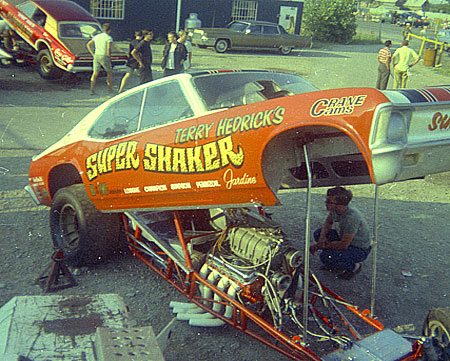
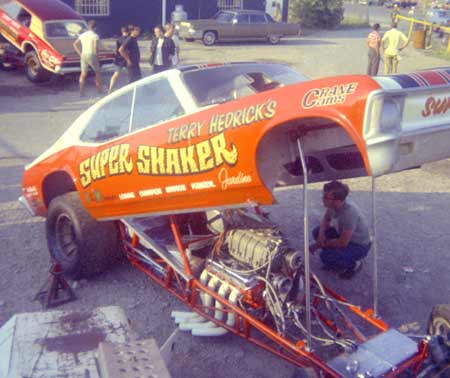
Scan of 1968 Kodak Instamatic negative produced this. Not bad for a cheap, plastic lens camera, but even at this reduced size you can see it is loaded with dust marks.
Tip of the Week: This week’s tip involves a free piece of software from — surprise — Polaroid Corporation. (PRDCQ) You’ve no doubt heard that Polaroid recently stopped production of their instant film stocks. That is a sad event for those enjoy shooting with Polaroid cameras; but I’m more concerned with the survival of Polaroid software. More specifically, Polaroid’s free Dust and Scratches application.
If you are anything like me, you probably have a fair collection of film negatives. Even if you shoot nothing but digital today, some of your best work may have been captured on film.
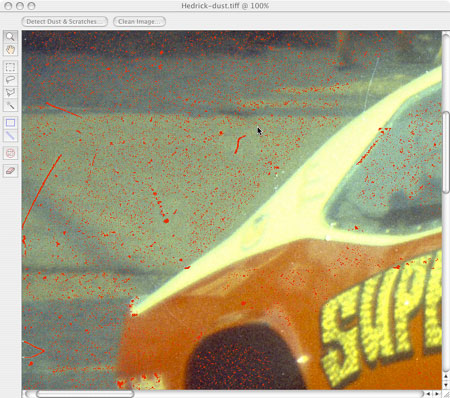
Red marks indicate the mask created by the Polaroid software. When you clean the image, only the red areas will be effected.
If you want to use some of those older film images in today’s digital world, you basically have two choices. You can pay a lab to create digital images from your negatives; or you scan the negatives yourself. Professional scanning tends to be expensive, so if you have more than a handful of images, a film scanner may be you best choice.
Negative scanning, however can be quite labor intensive. One of the biggest problems, particularity with older negatives, is dirt and scratches. Even tiny particles of dust will be magnified when the resulting scan is enlarged to a usable size. You can clone out the dust marks with a program like Photoshop, but if the dust spots are numerous, retouching becomes extremely time consuming.
Scanner manufacturers usually incorporate some form of dust removal in their scanners. These systems can be effective, but you don’t usually have much control over a hardware based dust removal system.
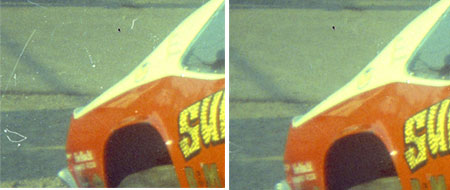
Image on the left shows a portion the image as it came from the scanner.
As you can see it would take hours to spot all the dust marks. Right image shows the same area after cleaning with the Polaroid Dust and Scratch Removal software. There is still work to be done, but more than 80% of the spots are gone. Tweaking the settings might eliminate even more marks.
Enter Polaroid’s Dust and Scratches Removal software. In the past, Polaroid manufactured a number of film and flat-bed scanners. I’m not sure if they are still producing this equipment, as according to the Polaroid website, most of the scanning equipment is no longer in production.
Fortunately, much of the software is still available online.
“So what?” you say. “I don’t own a Polaroid scanner.”
I’ll let you in on a secret. I don’t own a Polaroid scanner either. But I use Polaroid software with my Minolta Dimage Scan Dual III film scanner. I also use it with my Microtek flat bed scanner.
I first discovered Polaroid Dust and Scratch Removal Software a few years ago. I was scanning in a number of old 126 negatives taken when I was in my early teens. Besides being over 40 years old, it appears the original drug store processing lab wasn’t very concerned with cleanliness. The negs were a mess.
The Minolta Dimage III isn’t designed to scan 126 negatives, but 126 and 35mm negs are exactly the same height. So I was able to insert the 126 strips into the Minolta’s 35mm film carrier.
Because the carrier is not intended for the 126 format, I lost about 1/8″ at the top of each frame. That was no a big deal. What was a big deal was the hundreds of dust specs sprinkled over the final scans.
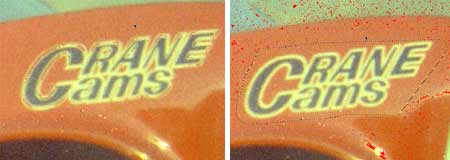
Of course there will be times the software thinks a crucial part of the image is dust or dirt.
Notice how the cleaning process has removed some of the lettering on this race car (left.)
After reverting the image, I use the select tool to make a loose selection around the effected letters. Now there are no red marks around the lettering, so the cleaning process will ignore this section of the image.
Retouching all those dust mites was out of the question, so I started to cast around for some sort of chemical cleaner. I doing so, I came across Polaroid’s software.
I wasn’t expecting much from Polaroid’s offering. I’ve used other dust removal software, including the despeckle filter in Adobe Photoshop. All of the applications I tried in the past remove dust specs by applying a soft blur to the image. This eliminates the visible dust, but you lose overall sharpness. The decrease in sharpness isn’t overwhelming, but I am of the opinion that any loss of sharpness is unacceptable.
I was pleasantly surprised to find Polaroid D&S software worked differently then the old “blur the image to hide the dust” applications. In the first stage of the process, the application analyzes the image and creates what appears to be vector mask of the image. Anything that appears to be a dust or scratch is flagged. You have a great deal of control over the masking process, so you can eliminate flaws of various sizes, as well as dark and light dust marks.
Because the program could identify small parts of the image as dust, Polaroid allows you to edit the mask. If the program confuses fine lines in the image with dust, you can edit the mask to protect the fine details.
Once the image mask is created, you can “clean” the image. This removes the masked imperfections without touching the unmasked zones. If you aren’t happy with the results you can adjust the settings and clean the image again.
The program is fairly fast. On my Powermac G5, creating a fairly detailed mask took about 30 seconds, while cleaning the image took another 40 seconds. Not exactly speedy, but far quicker than spotting hundreds of dust specs one by one.
The application does involve a bit of a learning curve, but once you learn how the settings work, it is simple and straight-forward.
The price tag for all this high-tech magic? How about zero. You can download the Dust and Scratches program for free. Not a demo or feature limited sample — you get the full working application with no restriction.
Want more? It is available for both Mac and Windows. In addition, you can choose between a stand-alone application or a Photoshop plugin. Because you load your images into the program after you have scanned them, there is no hardware compatibilities to be concerned with. As long as your scanner can create a standard TIFF or JPEG, you can use the software to clean the image.
The only problem I have experienced is that some images won’t load into the program. I use Vuescan as my scanner software for both my slide and flatbed scanners. For reasons I don’t understand, most of the scans saved out of Vuescan aren’t recognized by Polaroid’s software. Opening the image in Photoshop and re-saving as either a TIFF or JPEG generally fixes the problem. Sometimes I have had to save files several times before I could get the Dust and Scratches program to recognize images.
This isn’t Polaroid’s problem, as the software is designed to be used with their own scanning hardware. They offer no guarantee that it will work with a Minolta scanner. Polaroid should be congratulated for offering the software to anyone who wants to use it. If there is a problem with files created with non-Poloroid software and hardware, that should not be Polaroid’s concern.
The final step is to clone out any marks the software didn’t find and to color balance the image.
Even with the file opening hassles, I find Polaroid’s Dust and Scratch Removal software to be a huge time saver. Poloroid is still in business and they are even said to be on the verge of releasing a new digital camera with a built in printer — continuing the “instant print” legacy.
Despite this, you can’t count on the dust removal software being available in the future. My suggestion is that you download the software now, even if you don’t have a need for it right now. If you find yourself with a box full of dusty, scratched negatives, you will be awfully glad you did.
Download http://www.polaroid.com/service/software/poladsr/poladsr.html Poloroid Dust and Scratch Removal Utility
UPDATE 10/25/2009: The original links for the dust and scratches software have gone dead, and I was afraid the software had become unavailable. Thankfully, Alphatracks reader Jurek Woźniak discovered links where you can still locate copies of this software. Remember, there is no support for the D&S software, so don’t bother the folks at Polaroid if you run into difficulties.
Woźniak’s links are:
Download Dust and Scratches for the Windows PC:
Download Dust and Scratches for the Mac
Follow the comments stream below to find links for the appropriate read me files.
Thanks Jurek! You’ve made a lot of photographer/scanners very happy!
Technorati Tags:

Thank you so much for this advice. That’s what I need to repair some pictures from my dad for his 50th brithday. He will be suprised about the editing.
Hi, I canÂ’t understand how to add your site in my rss reader. Can you Help me, please 🙂
http://muz-on.net/banner.gif
Really useful tip – I was about to give up slide scanning and throw my scanner in the bin until I found this! Thank you!
Ðу а что еще пиÑать шоб не потерли? 🙂
One of the most useful little utility programs I’ve ever come across. Thanks a million for posting this!!!
I’ve never given this a try, but I think it’s about time I do.
Hey,
the Download-Link doesnt work – looks like Polaroid changed the link?
Does anyone have the mac version
I’d be glad anyone who can uplod this filter (for windows) somewhere online, since Polaroid link is broken ;/
Hi, i have searched and searched online using google etc. and have not been able to find the polaroid file to download. There are a lot of sites showing the now dead link to the old polaroid site which is not there anymore.
Does someone have it ? Could i download it please ? or you can send it to me at agape7@westnet.com.au
The file i need is called ‘poladsr’ apparently, i need it for windows (not mac)
Thanks for your help.
Kindest regards,
John.
I had a Polaroid scanner a while back and the program is excellent. I recently tried it on some medium format scans but it stalls, maybe the files are too big, hence searching and coming across this thread. Anyway I have the PC file program, don’t know if it contains the the Photoshop plugin as well and the Mac Application and plugin but not the distribution files but I guess you could just copy the files to the appropriate place and it would work. I’ll try and figure out a way of lodging the files somewhere where they could be downloaded.
I have found a copy of the Polaroid software by using the Internet Archive Wayback machine (which archives & stores historic copies of web pages).
The URL for the Dust & Scratch removal tool is:
http://web.archive.org/web/*/www.polaroid.com/service/software/poladsr/pdsr1_0.exe
I hope you all find it useful !
Kind regards to all,
Jurek
….I forgot to mention that my previous posting was the URL for the Windows version. The MAC version can be found here:
http://web.archive.org/web/*/www.polaroid.com/service/software/poladsr/pdsrmac1_0.sit
Regards,
Jurek
….and it’s me again ! I’m sorry for so many posts, I should have waited until I had gathered all the information and then just posted one message.
I was looking for the README files to accompany the program files, but they were a bit harder to find. Here they are:
For Windows:
http://web.archive.org/web/20071022033517/http://www.polaroid.com/service/software/poladsr/pdsr_readme.pdf
For MAC:
http://web.archive.org/web/20071022033517/http://www.polaroid.com/service/software/poladsr/mac_pdsr_readme_r2.pdf
The Windows ReadMe says that the program automatically installs the Adobe plugin if it finds Photoshop 5.0 (or above) on the system.
The MAC ReadMe refers to a more recent version of the program file (pdsrmac1_2.sit) – but I haven’t been able to find that, sorry guys. The Wayback Machine is a bit awkward to use.
Regards,
Jurek
Kicking off 2010’s mixed martial arts is the brilliant UFC 108. It’s definitely going to be a great event with the kickoff being Evans vs Silva going head to head. You can watch santos vs yvel fight video for FREE in full HD without paying that grotty $55.95 PPV cost.
Gut zu Wissen. Kommt hier noch ein Folgeartikel? Würde sehr gern einiges mehr darüber hören. Kannst du mir per Mail antworten?
Hi Tom,
Came across the site by accident, and most appreciative of the link to the Polaroid software as I have just started trying to recover some old negatives. Just tried a couple of very bad pictures and it seems to be very simple and effective.
Now, do you, or does anyone else, know of any similar software to remove or reduce some colored spots – maybe from mould – on the negatives? Tried marking as noise or scratch but no effect. Could use a cloning tool, but there are a lot of spots!
Rob
Hi,
Can someone upload the PC version link as we cannot find it on the polaroid website.
Thnx
Here is the link that works :
http://web.archive.org/web/20071022033517/http://www.polaroid.com/service/software/poladsr/pdsr1_0.exe
hi bod,
I tried your link, but it says the archive say “Data Retrieval Failure.”?
Is there any other way to get it?
best regards
scanner
Thanks for taking the top out to write this great/ topic.
I wont to download this softwor
Hold yourself responsible for a higher standard than anyone else expects of you. Never excuse yourself. Thank You. . . .
Thank you for the sensible critique. Me & my neighbour were preparing to do some research about that. We got a good book on that matter from our local library and most books where not as influensive as your information.
The archive.org internet wayback machine links do not work either …. so here is how you get it:
* There is a copy available on bittorrent. Search for “polaroid dust removal” using the bittorrent search engine of your choice. If you are unfamiliar with bittorrent then don’t bother with that.
* The file name of the Polaroid Dust Removal Windows Installer is “pdsr1_0.exe” (without the double quotes, of course). Google the file name and see if you can find a copy somebody archived on their own servers. This is how I got mine. Similar procedures applies for the mac file.
Whatever you do, do not forget the scan your download thoroughly with an up-to-date virus scanner … the approaches detailed above are risky and will take you straight into the jungle part of the ‘Net.
Good Luck,
cklammer
Congratulations! You have just won a new rss reader 🙂 .. really delicious article, Mike.
good stuff thanks
What a refreshing subject. Several the points you raise up seriously echo out how I really feel. We’re surely similar. This web site truly have a whole lot of high quality blog posts. I will surely bookmark this webpage and I really don’t book mark loads of web sites.
burn Nintendo wii games cd
you hit some good concepts, nice job.
its working like a charme! this is i was searching for. thx a lot dude.
this realy is a helpful program serious ,,tanks
you are professional.
This is a great technique. I literally have tons of photos I took in the late 70’s that have these scratches. I am going to give this a try to clean them up. Thanks!
i always use free virus scanners on the internet coz they are quite good too*~-
Capital One particular car loan terms include 30, 60 and 72 months. Money One, as opposed to other firms I have done internet business with is totally inflexible with regards to adjusting there costs. Even when the big costs are resulting from all from the very small hidden costs they’ve. Capital One particular Financial is also concerned with instalment lending, healthcare financing, and little small business lending activities.
This is really a very efficient software!
I ask all my buddies to visit this web site..
..
and I hope they’ll undoubtedly like..
You have a pretty awesome site here, good work and im glad i stumbled on it.
Loving your post. I think you should post more often, you clearly have talent for blogging!
Great n Thanks. Cool article Keep walking.I just added your site to my bookmark page.
Thanks for providing such a useful information.
Nice stuff.keep it up
Awesome, that is precisely what I was scanning for! Your post just spared me alot of searching around
I’ll make certain to put this in good use!
I like your content. Thanks for this!
I am happy to visit here. I hope you continue to do the sharing through the post to the reader.
If you use the Wayback Machine link and just search for http://web.archive.org/web/*/http://www.polaroid.com/service/software/poladsr/pdsrmac1_0.sit you can access the Polaroid Scratch and Dust Remover file for download.
Sorry – search for http://www.polaroid.com/service/software/poladsr/pdsrmac1_0.sit…anyway, just used it to download today, 12/5/2010.
Thanks for the info dude!
i have a great time reading your site. Keep it up
Hi, maybe i’m being a little bit off topic here, but I was browsing your site and it looks attractive. I’m setting up a blog and trying to make it look clean, but everytime I touch it I mess something up. Did you design the blog yourself? Could someone with little experience do it, and add updates without messing it up? Anyways, good information on here, very solid.
This is a great piece of software to touch up photos.
I rather loved browsing your Free Dust and Scratch Removal software saves your scans | Alphatracks write-up. We are brand new to using WordPress as well as blogging, would be thankful if you read through my own web page.Thanks
Nice article! This is a really good blog! Thank you! You’ll find more informations on Lingerie de charme. There’s everything that you need!
I’ve read some good stuff here. Definitely worth bookmarking for revisiting.
Does anyone know where to find the photoshop plugin? Thanks!
The old download links no longer work but i found it pretty easily using Google at
http://polaroid-dust-scratch-removal-software.en.softonic.com/
It says it’s not compatible with windows 7 but I tried it & it works fine using Windows 7 64bit
& as its a 32bit program Windows 7 32bit should be fine as well.